Your tickets, but makethem cartoons.

Some GitHub issues run for hundreds of lines.
Ticketoon turns the important parts into a picture you can start with.

Choose your repositories on GitHub. No API key needed.

Before: 110 linesAfter: the picture
Issues #42

Filtering breaks on page 5

## Summary
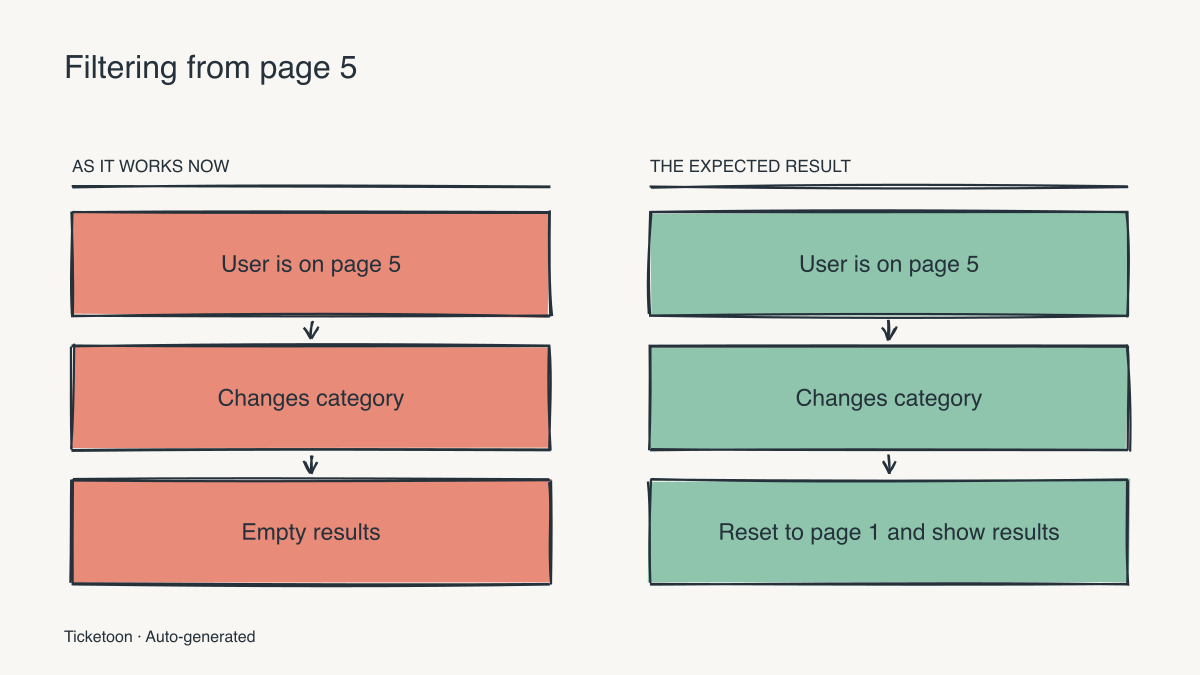
Changing category on page 5 leaves the product list empty.
Matching products exist, but the current page stays at 5.
 
## Reported behavior
The reporter browsed several pages before choosing Books.
The list switched to the empty state after the filter changed.
Refreshing the page did not make the expected products appear.
Choosing page 1 manually restored the matching results.
 
## Reproduction
1. Open the product list with no category selected.
2. Navigate to page 5.
3. Change the category to Books.
4. Observe the empty list.
5. Return to page 1 without changing the category.
6. Observe that matching books are present.
 
## Expected behavior
Changing the category resets pagination to page 1.
The next request includes the new category and page 1.
The list shows the matching products returned by that request.
 
## Current request sequence
GET /products?page=5
User selects category=books
GET /products?category=books&page=5
Response contains no items for that page.
The interface displays the empty-results message.
 
## Request sequence after the fix
GET /products?page=5
User selects category=books
Pagination changes to page=1.
GET /products?category=books&page=1
Matching products appear in the list.
 
## Notes from triage
The category filter itself is being applied.
This report concerns the retained pagination value.
Returning to page 1 is enough to recover the results.
Do not change the empty-state copy to hide the problem.
The issue is about what happens when the filter changes.
 
## Reproduction matrix
Books: change category while on page 2.
Expected: reset to page 1 and show matching results.
Check the request parameters and the selected page.
Books: change category while on page 3.
Expected: reset to page 1 and show matching results.
Check the request parameters and the selected page.
Books: change category while on page 5.
Expected: reset to page 1 and show matching results.
Check the request parameters and the selected page.
Books: change category while on page 8.
Expected: reset to page 1 and show matching results.
Check the request parameters and the selected page.
Clothing: change category while on page 2.
Expected: reset to page 1 and show matching results.
Check the request parameters and the selected page.
Clothing: change category while on page 3.
Expected: reset to page 1 and show matching results.
Check the request parameters and the selected page.
Clothing: change category while on page 5.
Expected: reset to page 1 and show matching results.
Check the request parameters and the selected page.
Clothing: change category while on page 8.
Expected: reset to page 1 and show matching results.
Check the request parameters and the selected page.
Home: change category while on page 2.
Expected: reset to page 1 and show matching results.
Check the request parameters and the selected page.
Home: change category while on page 3.
Expected: reset to page 1 and show matching results.
Check the request parameters and the selected page.
Home: change category while on page 5.
Expected: reset to page 1 and show matching results.
Check the request parameters and the selected page.
Home: change category while on page 8.
Expected: reset to page 1 and show matching results.
Check the request parameters and the selected page.
Electronics: change category while on page 2.
Expected: reset to page 1 and show matching results.
Check the request parameters and the selected page.
Electronics: change category while on page 3.
Expected: reset to page 1 and show matching results.
Check the request parameters and the selected page.
Electronics: change category while on page 5.
Expected: reset to page 1 and show matching results.
Check the request parameters and the selected page.
Electronics: change category while on page 8.
Expected: reset to page 1 and show matching results.
Check the request parameters and the selected page.
 
## Acceptance checks
[ ] Changing a category resets the selected page to 1.
[ ] The product request uses the newly selected category.
[ ] The product request uses page=1.
[ ] Matching products appear when the response contains items.
[ ] An empty response still uses the existing empty state.
[ ] Moving between pages without changing category still works.
[ ] Clearing the category filter also returns to page 1.
 
## Review questions
Where are category and page state updated today?
Can the two values be updated before the next request?
Which existing pagination tests should cover this regression?
 
## The change in one sentence
When the category changes, reset to page 1 and show the results.
110 lines. The point is in there somewhere.

a little
Ticketoon magic
Ohhh. Now I see it.
BeforeAfterCategory: booksCategory: booksPage 5 · No resultsPage 1 · Hello, books!A filter. An empty page.A reset. A happy ending.The bug and the expected change, at a glance.

Keep the full story. Give the next reader a way in.

Same issue.
Clearer picture.

Reproduction steps. Logs. Acceptance criteria.
Start with the picture, then dig into the details.

Example issue #42

Filtering breaks on page 5

110 lines of reproduction steps, request traces, and acceptance checks.

## Summary
Changing category on page 5 leaves the product list empty.
Matching products exist, but the current page stays at 5.
 
## Reported behavior
The reporter browsed several pages before choosing Books.
The list switched to the empty state after the filter changed.
Refreshing the page did not make the expected products appear.
Choosing page 1 manually restored the matching results.
 
## Reproduction
1. Open the product list with no category selected.
2. Navigate to page 5.
3. Change the category to Books.
4. Observe the empty list.
5. Return to page 1 without changing the category.
6. Observe that matching books are present.
 
## Expected behavior
Changing the category resets pagination to page 1.
The next request includes the new category and page 1.
The list shows the matching products returned by that request.
 
## Current request sequence
GET /products?page=5
User selects category=books
GET /products?category=books&page=5
Response contains no items for that page.
The interface displays the empty-results message.
 
## Request sequence after the fix
GET /products?page=5
User selects category=books
Pagination changes to page=1.
GET /products?category=books&page=1
Matching products appear in the list.
 
## Notes from triage
The category filter itself is being applied.
This report concerns the retained pagination value.
Returning to page 1 is enough to recover the results.
Do not change the empty-state copy to hide the problem.
The issue is about what happens when the filter changes.
 
## Reproduction matrix
Books: change category while on page 2.
Expected: reset to page 1 and show matching results.
Check the request parameters and the selected page.
Books: change category while on page 3.
Expected: reset to page 1 and show matching results.
Check the request parameters and the selected page.
Books: change category while on page 5.
Expected: reset to page 1 and show matching results.
Check the request parameters and the selected page.
Books: change category while on page 8.
Expected: reset to page 1 and show matching results.
Check the request parameters and the selected page.
Clothing: change category while on page 2.
Expected: reset to page 1 and show matching results.
Check the request parameters and the selected page.
Clothing: change category while on page 3.
Expected: reset to page 1 and show matching results.
Check the request parameters and the selected page.
Clothing: change category while on page 5.
Expected: reset to page 1 and show matching results.
Check the request parameters and the selected page.
Clothing: change category while on page 8.
Expected: reset to page 1 and show matching results.
Check the request parameters and the selected page.
Home: change category while on page 2.
Expected: reset to page 1 and show matching results.
Check the request parameters and the selected page.
Home: change category while on page 3.
Expected: reset to page 1 and show matching results.
Check the request parameters and the selected page.
Home: change category while on page 5.
Expected: reset to page 1 and show matching results.
Check the request parameters and the selected page.
Home: change category while on page 8.
Expected: reset to page 1 and show matching results.
Check the request parameters and the selected page.
Electronics: change category while on page 2.
Expected: reset to page 1 and show matching results.
Check the request parameters and the selected page.
Electronics: change category while on page 3.
Expected: reset to page 1 and show matching results.
Check the request parameters and the selected page.
Electronics: change category while on page 5.
Expected: reset to page 1 and show matching results.
Check the request parameters and the selected page.
Electronics: change category while on page 8.
Expected: reset to page 1 and show matching results.
Check the request parameters and the selected page.
 
## Acceptance checks
[ ] Changing a category resets the selected page to 1.
[ ] The product request uses the newly selected category.
[ ] The product request uses page=1.
[ ] Matching products appear when the response contains items.
[ ] An empty response still uses the existing empty state.
[ ] Moving between pages without changing category still works.
[ ] Clearing the category filter also returns to page 1.
 
## Review questions
Where are category and page state updated today?
Can the two values be updated before the next request?
Which existing pagination tests should cover this regression?
 
## The change in one sentence
When the category changes, reset to page 1 and show the results.

The long version has the context. The picture brings the bug and the expected change into focus.

Ticketoon’s visual explanation
Before / After diagram for: Filtering breaks on page 5

Illustrative issue context, paired with output from the Ticketoon renderer.

Open an issue.
Get the picture.

Add Ticketoon to the repositories you choose, then open an issue. It reads the issue and adds a visual explanation in GitHub. No separate account or API key needed.

I’ll take it
from here.
  1. 1

    Write it your way.

    Open a GitHub issue with the bug, change, or question you want to explain.

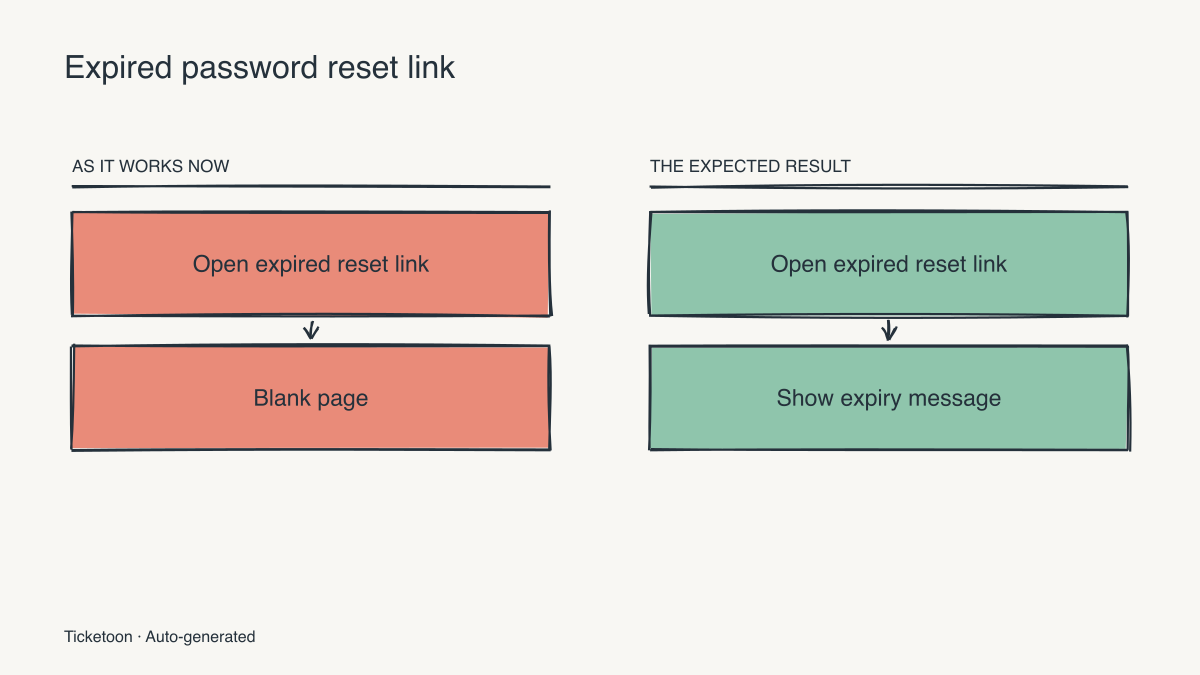
    Expired reset links show a blank page
  2. 2

    Ticketoon connects the dots.

    It reads the issue and chooses a visual format that fits the explanation.

    IssueBefore / After
  3. 3

    The picture joins the conversation.

    A visual summary appears in a GitHub comment, ready for the next person who opens the issue.

    Actual Ticketoon output showing an expired reset link going from a blank page to a clear expiry message

A little drawing
goes a long way.

For the teammate catching up.
The maintainer triaging.
And you, three weeks from now.

Skip the wall-of-text stare.

A hundred lines of context can be hard to start. A picture gives you a foothold.

Spot the missing piece.

Bring open questions into focus before implementation.

Make async feel closer.

Let the next teammate catch the gist before diving into a long issue.

Keep the context together.

The issue, the discussion, and the explanation. All in GitHub.

Your next issue
has potential.

Less decoding.
More building.

Long issue. Shorter path to “I get it.”

Add to GitHub